
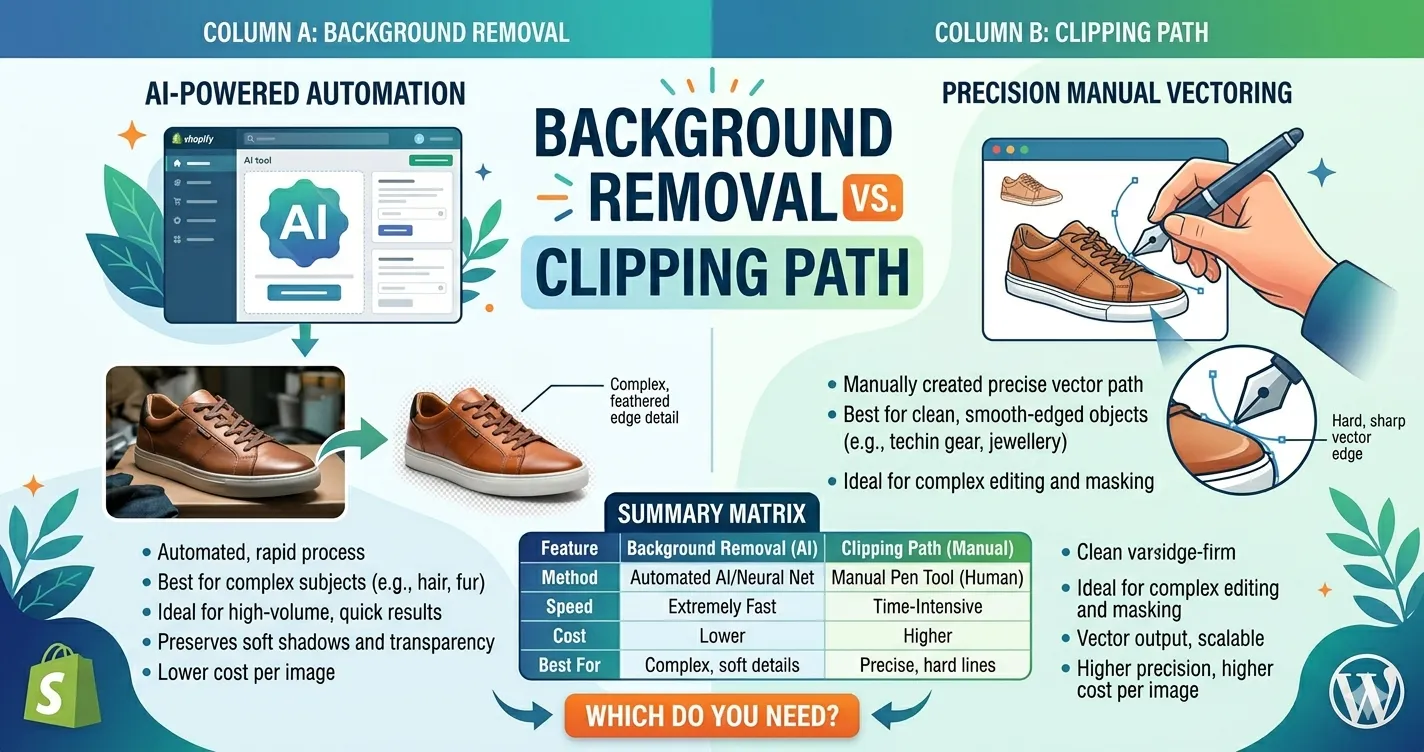
Background Removal vs Clipping Path: Which Do You Actually Need?
Product photos can make or break online sales. Whether you sell on Amazon, Shopify, Etsy, eBay, or your own e-commerce store, clean images help customers trust your brand faster.
But when it comes to editing product images, many businesses get confused between two common services: background removal and clipping path.
At first glance, they may seem identical. Both isolate subjects from the background. Both improve product presentation. And both are widely used in e-commerce photography.
But they are not the same process, and choosing the wrong one can affect image quality, editing flexibility, and even your workflow costs.
In this guide, we’ll explain the real difference between background removal and clipping path editing, when to use each one, common mistakes to avoid, and how Clipixie helps businesses streamline product image editing at scale.
Why This Comparison Matters for Online Businesses
The right editing method depends on your product type, image complexity, and end goal. For example:
- A fashion retailer may need detailed hair masking
- A jewelry brand may require pixel-perfect edges
- A real estate agency may want quick sky replacements
- A marketplace seller may simply need white backgrounds for Amazon compliance
Using the wrong editing approach can lead to:
- Jagged edges
- Missing details
- Unrealistic cutouts
- Poor marketplace approval rates
- Slower editing turnaround
Understanding the difference helps you:
- Save editing costs
- Improve image quality
- Speed up product uploads
- Maintain consistent branding
Quick Comparison: Background Removal vs Clipping Path
| Feature | Background Removal | Clipping Path |
| Purpose | Remove or replace background | Create precise cutout paths |
| Best For | Complex subjects, hair, soft edges | Solid objects with defined edges |
| Editing Method | AI, masking, or manual techniques | Pen tool vector path |
| Precision Level | Moderate to very high | Extremely high |
| Common Use Cases | Fashion, portraits, furniture | Jewelry, electronics, shoes |
| Supports Transparent Backgrounds | Yes | Yes |
| Ideal for Bulk Editing | Yes | Sometimes |
| File Flexibility | Good | Excellent for advanced editing |
If your image has clean, hard edges, a clipping path is usually the better option. If the image contains hair, fur, transparent objects, or soft shadows, background removal techniques work better.
What Is Background Removal?
Background removal is the process of separating a subject from its original background. The goal is usually to:
- Replace the background
- Create transparency
- Add a clean white backdrop
- Improve visual consistency
This process can be done using:
- AI tools
- Layer masking
- Manual selection
- Advanced masking techniques
Best Use Cases for Background Removal
Background removal works well for:
- Fashion photography
- Portraits
- Furniture
- Lifestyle products
- Real estate images
- Social media visuals
It is especially useful when images contain:
- Hair
- Fur
- Transparent materials
- Soft edges
- Motion blur
- Shadows
Example
A clothing brand selling jackets online may need detailed edge refinement around fabric textures and model hair. In this case, simple vector paths are often not enough.
That’s where professional background removal services become more effective.
What Is a Clipping Path?
A clipping path is a manually created vector outline around an object using the Pen Tool in Photoshop. The editor creates anchor points around the product to produce extremely accurate edges.
Unlike AI cutouts, clipping paths are:
- Manually controlled
- Highly precise
- Ideal for commercial product editing
Best Use Cases for Clipping Paths
Clipping paths work best for products with:
- Hard edges
- Simple shapes
- Consistent outlines
Examples include:
- Watches
- Shoes
- Electronics
- Bottles
- Furniture
- Packaging products
Why E-Commerce Brands Use Clipping Paths
Many marketplaces require clean white backgrounds with professional isolation. A proper clipping path ensures:
- Sharp edges
- Consistent shadows
- Accurate product cutouts
- Easier catalog editing
This feature is especially important for businesses managing hundreds or thousands of SKUs.
The Biggest Difference Most Businesses Miss
The biggest difference is not just “background removal vs cutout.” It’s precision versus flexibility.
Clipping Path Prioritizes Precision
Because clipping paths use vector outlines, they create:
- Extremely sharp edges
- Clean product separation
- Better consistency for catalogs
But clipping paths struggle with:
- Hair
- Fur
- Smoke
- Glass transparency
- Fine details
Background Removal Prioritizes Natural Results
Advanced background removal can preserve:
- Soft shadows
- Hair strands
- Semi-transparent surfaces
- Organic edges
However, automated removal tools can sometimes produce:
- Inconsistent edges
- Missed details
- Artificial-looking cutouts
Professional editing combines manual refinement with masking techniques to avoid these issues.
When Should You Use Background Removal?
Choose background removal if your images include:
- Human Subjects Fashion e-commerce brands often need natural hair retention and realistic edge handling.
- Complex Shapes Furniture, plants, and decorative products usually contain difficult contours.
- Transparent or Reflective Objects Glasses, bottles, and plastic packaging require masking techniques beyond standard clipping paths.
- Lifestyle Photography If you want to swap backgrounds for marketing campaigns or ads, background removal provides more flexibility.
When Should You Use Clipping Paths?
Choose clipping paths if your products have:
- Hard edges
- Defined shapes
- Commercial catalog requirements
Ideal Industries Include:
- Jewelry
- Electronics
- Automotive parts
- Footwear
- Home goods
- Industrial products
Clipping Paths Are Also Better For:
- Color correction workflows
- Shadow creation
- Bulk e-commerce editing
- Print-ready product catalogs
Common Mistakes Businesses Make
Using AI Tools for Complex Images
Automated editors are fast, but they often fail with:
- Hair
- Transparent products
- Intricate edges
This creates unnatural product images that reduce buyer trust.
Choosing Clipping Paths for Soft Objects
Clipping paths cannot properly isolate:
- Fur
- Smoke
- Fabric flyaways
- Semi-transparent details
Forcing clipping paths on these images creates harsh edges.
Ignoring Shadow Consistency
A perfectly cut product can still look unrealistic without proper shadows. Professional editing includes:
- Natural shadows
- Reflection control
- Consistent lighting adjustments
Prioritizing Speed Over Accuracy
Low-cost bulk editing often introduces:
- Uneven edges
- Pixelation
- Missing product details
For e-commerce businesses, poor image quality directly impacts conversions.
How to Decide Which Service You Need
Here’s a simple checklist.
Use Background Removal If:
- Your subject has soft or detailed edges
- You need flexible background replacement
- Your images contain people or hair
- You want realistic masking
Use Clipping Path If:
- Your products have clean edges
- You need highly precise cutouts
- You manage large e-commerce catalogs
- You require consistent commercial editing
In many cases, businesses actually need both techniques together. Professional editors often combine:
- Clipping paths
- Layer masking
- Shadow creation
- Retouching
- Color correction
to achieve the best final result.
| Need Cleaner Product Images Without the Guesswork?
Whether you need detailed clipping paths or advanced background removal, Clipixie helps e-commerce brands create marketplace-ready visuals faster. |
How Clipixie Helps E-Commerce Businesses Scale Faster
Many online sellers don’t have time to manually edit hundreds of product photos every week. That’s where Clipixie becomes valuable.
Clipixie provides professional photo editing services for:
- E-commerce brands
- Marketplace sellers
- Photographers
- Agencies
- Real estate businesses
Services Include:
- Background removal
- Clipping path editing
- Ghost mannequin
- Shadow creation
- Image retouching
- Color correction
Why Businesses Choose Clipixie
Consistent Quality
Professional editors manually refine images for clean, realistic results.
Faster Turnaround
Ideal for businesses handling seasonal launches or large product uploads.
Marketplace-Ready Images
Clipixie helps sellers meet Amazon, Shopify, Etsy, and e-commerce image standards.
Scalable Workflow
From small brands to enterprise catalogs, editing support scales with business growth.
Best Practices for Better Product Image Editing
Shoot with Good Lighting
Clean source images improve editing quality dramatically.
Use Consistent Angles
Uniform product positioning creates a stronger storefront appearance.
Avoid Busy Backgrounds
Simple backgrounds reduce editing complexity and improve turnaround time.
Keep Original Files
Always save high-resolution originals before editing.
Match Editing Style Across Products
Consistent shadows, brightness, and alignment improve brand trust.
Frequently Asked Questions
Is clipping path better than background removal?
Not always. Clipping paths are better for hard-edged products like electronics or shoes, while background removal works better for soft edges, hair, or transparent objects. The right option depends on the image type and editing goal.
Can clipping paths remove backgrounds completely?
Yes. Clipping paths isolate the subject from the background very precisely. Once the path is created, the background can be deleted, replaced, or made transparent.
Do e-commerce businesses use both services?
Yes. Many e-commerce brands combine clipping paths with masking, retouching, and background removal techniques for professional product presentation.
Which is better for Amazon product images?
For most Amazon product photos, clipping paths work well because products usually need clean white backgrounds and sharp edges. More complex products may require advanced masking techniques.
Does background removal improve conversions?
Professional product images often improve click-through rates and buyer trust. Clean backgrounds help customers focus on the product without distractions.
Can background removal help with social media ads?
Yes. Background removal makes it easier to create banners, lifestyle edits, and platform-specific creatives for Facebook, Instagram, Pinterest, and e-commerce advertising campaigns.
Does Clipixie manually edit images?
Yes. Clipixie combines professional manual editing techniques with efficient workflows to deliver cleaner, more accurate results than basic automated tools.
Can Clipixie handle bulk e-commerce editing?
Yes. Clipixie supports bulk image editing for e-commerce stores, agencies, photographers, and marketplace sellers managing large product catalogs.
How fast is the turnaround time?
Turnaround depends on image complexity and order volume, but Clipixie is built to support fast-moving e-commerce workflows and scalable editing needs.
Make Your Product Images Stand Out Across Every Sales Channel
Background removal and clipping path editing are both essential tools for e-commerce image optimization, but they solve different problems.
If you need ultra-clean edges for commercial product catalogs, clipping paths are often the best choice. If your images contain hair, transparency, or complex details, advanced background removal delivers more natural results.
The key is choosing the right editing approach for the right product. Clipixie helps e-commerce businesses simplify that decision with professional editing services designed for online selling, product consistency, and scalable growth.
Whether you manage a small Shopify store or a large marketplace catalog, high-quality product images can directly influence customer trust and conversions.
Ready to Improve Your Product Images?
Professional editing support can help your products look cleaner, more consistent, and more competitive across every sales channel.
| Get Professional Product Image Editing
Clean backgrounds. Sharp cutouts. Marketplace-ready images. Contact Us Today |