
How Much Does Professional Photo Editing Cost?: Full 2026 Guide for Smarter Buying
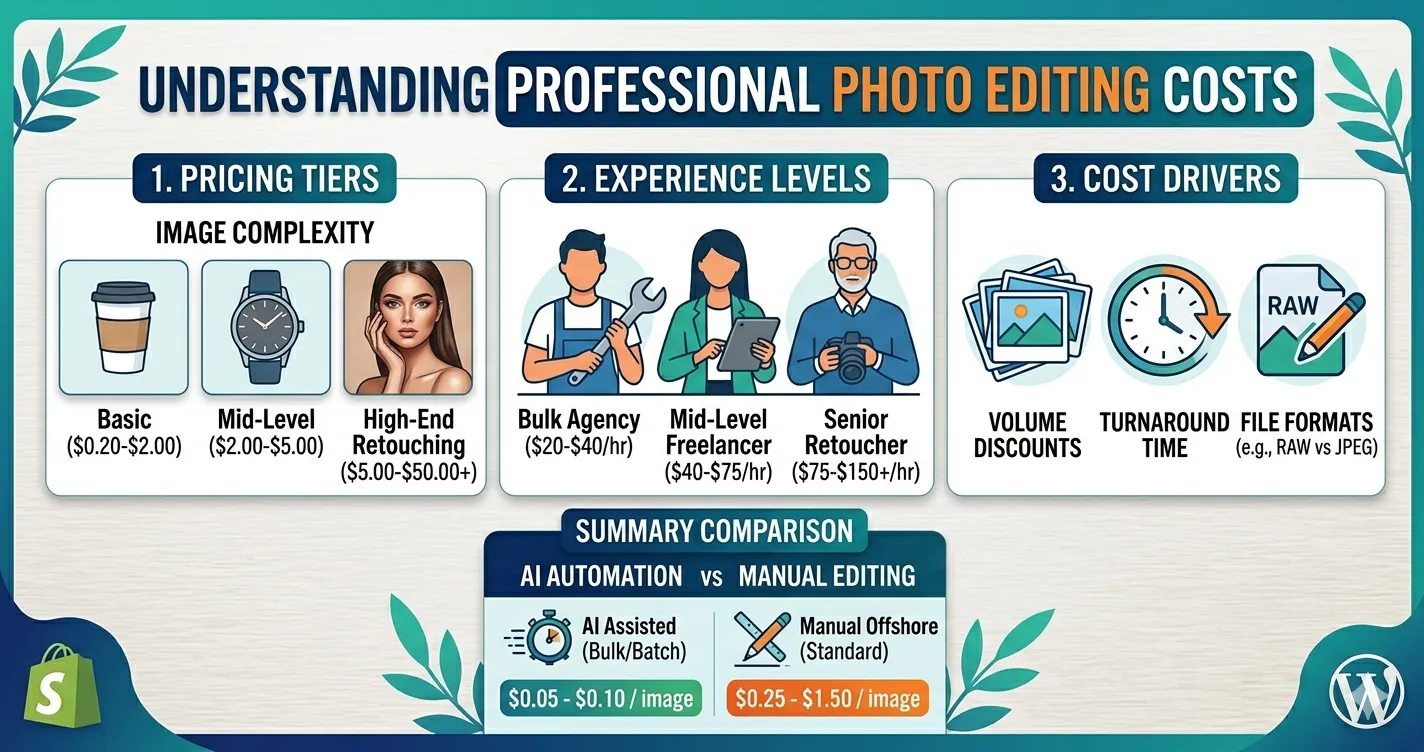
How much does professional photo editing cost in 2026? Most buyers can expect pricing to vary by image complexity, service type, volume, turnaround time, and quality level. Simple eCommerce edits may cost far less per image than detailed retouching, ghost mannequin work, jewelry cleanup, real estate enhancement, or creative compositing.
Here’s the thing: the cheapest quote is not always the best deal. Bad editing can make products look fake, listings feel inconsistent, and customers hesitate before buying. This guide breaks down what affects pricing, how to compare options, and how Clipixie helps buyers get clean, catalog-ready edits without guesswork.
Why Photo Editing Pricing Matters
Photo editing pricing matters because image quality directly affects how buyers judge your brand, product, property, or portfolio. When images look polished, consistent, and accurate, customers feel more confident. Trust drops fast when images look rushed, over-edited, or inconsistent.
For eCommerce and marketplace sellers, image editing is not just a design expense. It supports conversion, compliance, and brand presentation. Amazon, for example, requires at least one compliant main product image and recommends multiple supporting images to help customers evaluate products effectively.
For real estate businesses, photo editing also carries trust and disclosure risks. California’s 2026 real estate photo law requires disclosure when listing photos have been digitally altered in ways that change property elements, while routine adjustments like lighting, sharpening, white balance, and cropping are treated differently.
| IMPORTANT |
| Low-cost edits can become expensive if they create rejections, returns, buyer confusion, or compliance issues. The right editing partner should protect image quality, product accuracy, and brand consistency, not just lower the per-image rate. |
Quick 2026 Photo Editing Cost Overview
Professional editing prices usually fall into broad ranges based on the work required. Public 2026 pricing guides list basic editing around $0.50–$5 per image, product editing services from roughly $0.29–$10 per image, standard retouching around $5–$25 per image, and high-end retouching or creative manipulation from $25–$100+ per image.
| Editing Service | Typical 2026 Market Range | Best For | Cost Driver |
| Basic crop, resize, cleanup | $0.50–$5/image | Simple web images, social posts, catalog cleanup | Low complexity |
| Background removal | $0.29–$2.50/image | eCommerce, Amazon, Shopify, marketplaces | Edges, transparency, hair, glass |
| Clipping path | $0.29–$7/image | Product cutouts, catalogs, ads | Shape complexity |
| Color correction | $0.45–$8/image | Apparel, products, events, real estate | Accuracy and batch consistency |
| Ghost mannequin | $1.20–$3+/image | Fashion, apparel, jackets, shirts | Neck joint, inner lining, shape |
| Standard retouching | $5–$25/image | Portraits, lifestyle, product polish | Skin, fabric, object cleanup |
| High-end retouching | $25–$100+/image | Beauty, jewelry, advertising, campaigns | Detail level and revision needs |
| Hourly professional editing | $50–$150+/hour for agencies | Custom projects, complex batches | Scope uncertainty |
These ranges are useful for planning, not final quoting. Clipixie’s own service guidance explains that photo editing cost varies by project complexity and expertise required, and that bulk editing can be handled for single images or thousands of images.
What Professional Editing Includes
Professional photo editing means improving an image for a clear business purpose: selling, presenting, publishing, listing, or marketing. It can include background removal, clipping paths, color correction, retouching, image resizing, shadow creation, ghost mannequin effects, and file formatting.
Think of it like this: photography captures the raw material, while editing prepares that material for the buyer’s screen. A product photo may need a white background. A fashion image may need wrinkle removal and accurate fabric color. A real estate image may need balanced lighting without changing the truth of the space.
A typical workflow looks like this:
- Image review: The editor checks resolution, lighting, background, subject edges, and editing goals.
- Service matching: The image gets assigned to the right workflow, such as clipping path, retouching, color correction, or ghost mannequin editing.
- Manual editing: Skilled editors adjust the image carefully instead of applying one-click filters to every file.
- Quality control: The final image gets checked for edge accuracy, color consistency, file size, format, and brand requirements.
- Delivery: The edited files are returned in the requested format for web, print, marketplaces, or internal use.
| PRO TIP |
| The more specific your image goal, the easier it is to price accurately. “Make this look better” creates guesswork. “Remove the background, add a natural shadow, keep true color, and export JPG for Shopify” gives the editor a clear path. |
What Affects the Final Price?
The final cost depends on how much skilled work each image needs. Two photos may look similar at first, but one may take five minutes and the other may take thirty.
- Image complexity: A simple mug on a plain background costs less to edit than jewelry, lace, hair, glass, bicycles, furniture, or fur. Detailed edges take more time.
- Service type: Background removal, clipping path, ghost mannequin, color matching, skin retouching, and object removal all require different skill levels.
- Volume: Bulk orders usually lower the per-image price because the workflow becomes more repeatable. A 1,000-image catalog often prices differently than a 10-image one-off project.
- Turnaround time: Rush jobs can cost more because they require faster staffing, priority review, and tighter production planning.
- Revision expectations: Clear instructions reduce revisions. Vague briefs often create extra review cycles.
- File requirements: Marketplace-ready files, layered PSDs, transparent PNGs, print-ready TIFFs, or multiple export sizes may affect cost.
- Quality level: Clean catalog editing costs less than premium advertising retouching because the finish level is different.
| Get A Sample Before You Commit
Not sure what your images need? Test the workflow first and compare the output before sending a larger batch. |
Who Needs Professional Photo Editing?
Professional editing helps any buyer who relies on images to create trust, clicks, bookings, or sales.
- eCommerce brands need consistent product images across websites, ads, email campaigns, and social content.
- Marketplace sellers need clean, compliant visuals for Amazon, Etsy, Walmart, eBay, and other selling platforms.
- Photographers need post-production support when deadlines are tight or image volume is high.
- Real estate businesses need bright, accurate, inviting photos that represent properties clearly.
- Fashion and apparel brands need ghost mannequin effects, wrinkle cleanup, color consistency, and natural garment shape.
- Agencies and online businesses need repeatable editing support for client campaigns, catalogs, and launch schedules.
How Better Editing Improves Business Results
Better editing improves business results by making images clearer, more trustworthy, and easier to buy from. Let’s be real; online buyers judge fast. A blurry, shadow-heavy, or inconsistent image can make a good product look average.
- Higher trust: Clean images make your brand look serious, organized, and reliable.
- Better conversion potential: Shoppers can understand product shape, color, texture, and scale faster.
- Fewer returns: Accurate color and realistic editing reduce surprise when the product arrives.
- Stronger catalog consistency: Matching backgrounds, crops, lighting, and shadows make your store feel polished.
- Faster launches: Outsourced editing helps you publish new products, listings, or campaigns without slowing your team.
- Less internal stress: Your team can focus on selling, shooting, or client work instead of fixing hundreds of images.
| Compare Options With Clarity
Professional editing should be easy to price, easy to test, and easy to scale. Review Clipixie’s service approach before your next batch. |
How Buyers Should Compare Editing Quotes
The smartest buyers compare value, not just the lowest per-image number. A $0.50 edit that needs three revisions may cost more in time than a $2 edit done correctly the first time.
When comparing vendors, ask these questions:
What is included in the price?
Does the quote include background removal only, or does it also include shadow, color correction, resizing, and quality control?
How are complex images priced?
A flat rate may sound simple, but detailed products often need custom pricing.
Who edits the images?
Manual editing matters for clipping paths, ghost mannequin work, jewelry, apparel, real estate, and detailed retouching.
How fast is delivery?
Low prices can hide slow turnaround or limited support.
Are revisions included?
A clear revision policy protects both sides.
Can the team handle volume?
A single freelancer may work well for small batches. A professional editing team fits better when you need hundreds or thousands of images.
Do they understand your use case?
Editing for Amazon is different from editing for a luxury jewelry campaign, real estate listing, wedding gallery, or fashion catalog.
DIY vs. Clipixie Professional Editing
DIY editing can work for a small number of simple images. Professional editing makes more sense when accuracy, volume, consistency, and time matter.
| DIY Editing | Clipixie Professional |
| Good for quick personal edits or small test images | Built for business-ready product, catalog, marketplace, and campaign images |
| Quality depends on your editing skill and available time | Experienced editors follow image-specific instructions and quality checks |
| One-click tools may struggle with hair, glass, jewelry, apparel edges, and shadows | Manual editing handles detailed edges, natural shadows, clipping paths, and retouching |
| Batch filters can create inconsistent color or unnatural results | Editors match color, crop, lighting, and presentation across image sets |
| Hard to scale during busy product launches or client deadlines | Clipixie can support bulk editing for large image volumes |
| Revisions take your own team away from selling or shooting | A professional workflow helps reduce internal editing load |
| Low software cost, higher time cost | Clearer production process, cleaner output, and stronger brand consistency |
Clipixie editors manually handle each image based on the work required. That means detailed edits are not treated like batch filters or automatic presets.
Common Pricing Mistakes to Avoid
- Choosing only the cheapest quote: Low pricing can hide poor edges, fake shadows, weak color control, or limited revision support.
- Ignoring image complexity: A simple product and a detailed necklace should not cost the same if the editing work differs.
- Not asking what is included: Background removal, retouching, resizing, and shadow creation may appear as separate services.
- Sending unclear instructions: Vague briefs lead to more revisions and slower delivery.
- Forgetting marketplace requirements: Main images, file size, background color, crop ratio, and image dimensions can affect approval and performance.
- Using over-edited photos: Unrealistic skin, product color, or real estate edits can reduce trust.
- Skipping sample edits: A small test batch helps you check quality before ordering at scale.
- Not planning for volume: Product launches, seasonal catalogs, and real estate campaigns need editing capacity before the deadline hits.
Practical Tips to Get Better Value
Better results start before the editor opens the file. Clean inputs, clear instructions, and realistic expectations help Clipixie deliver better output faster.
- Send original high-resolution files: Bigger, sharper files give editors more detail to work with.
- Group similar images together: Similar products, angles, or lighting setups can speed up the workflow.
- Share final use cases: Tell the editor if files are for Amazon, Shopify, print, MLS, social ads, or a brand catalog.
- Define the background: White, transparent, lifestyle, gray, or custom background choices affect editing time.
- Confirm shadow style: Natural shadow, drop shadow, reflection shadow, and no shadow create different looks.
- Provide reference images: A finished example removes guesswork.
- Explain color expectations: Product color should match the real item, especially for apparel, furniture, cosmetics, and jewelry.
- Mention file format needs early: JPG, PNG, TIFF, PSD, and WebP exports can change delivery steps.
- Set batch priorities: Tell Clipixie which images need the fastest delivery if you have a large order.
- Review a sample first: Approve the style before full production begins.
| SIMPLE TIP |
| One approved sample image can save hours later. Use it as the standard for the full batch so every image follows the same look. |
Pre-Submission Checklist for Faster Quotes
Use this checklist before requesting a professional photo editing estimate.
| Category | Checklist |
| Image files | Upload original high-resolution images |
| Image files | Remove duplicate or rejected shots from the batch |
| Editing scope | List each service needed: background removal, retouching, clipping path, color correction, ghost mannequin, resizing |
| Editing scope | Mark images that need advanced or special work |
| Output needs | Confirm file format: JPG, PNG, TIFF, PSD, or WebP |
| Output needs | Share final platform: Amazon, Shopify, Etsy, MLS, print, social, website |
| Brand style | Send sample images or brand guidelines |
| Brand style | Confirm background, crop, shadow, and color style |
| Timeline | Share deadline and priority images |
| Review | Request a sample edit before full batch approval |
2026 Pricing Trends Buyers Should Know
Photo editing pricing in 2026 reflects a mix of automation, manual skill, and growing demand for faster image production. AI tools can speed up simple tasks, but commercial-quality editing still needs human review for accuracy, brand fit, and natural results.
- More buyers test before ordering: Free trials and sample edits help buyers compare quality before sending large batches.
- Manual QA matters more: AI can create quick results, but human review catches edge problems, color shifts, fake textures, and product inaccuracies.
- Bulk workflows are growing: eCommerce brands and agencies need repeatable editing systems for high-volume catalogs.
- Realistic editing gets more attention: Buyers want polished images that still represent the real product or property.
- Transparent pricing wins trust: Buyers prefer clear service ranges, simple quote steps, and no surprise fees.
Manual editing remains the quality benchmark for business-critical images.
How Clipixie Can Help
Clipixie helps buyers get professional, consistent photo edits without turning pricing into a guessing game. The team works across services such as background removal, clipping paths, ghost mannequin effects, color enhancement, image resizing, photo recoloring, eCommerce photo editing, and retouching. Clipixie’s portfolio page also notes support for industries such as eCommerce, fashion, jewelry, real estate, and photographers.
For clipping path work, Clipixie explains that expert editors hand-draw paths and manually edit images for natural-looking professional results, rather than relying only on automated software.
Clipixie is a strong fit when you need:
- Transparent service guidance for simple, standard, or complex edits
- Manual image editing for clean edges, natural shadows, and accurate details
- Bulk editing support for catalogs, product launches, and agency work
- Marketplace-ready output for eCommerce sellers
- Consistent quality control across large batches
- Flexible quote support based on complexity, volume, and turnaround
You can review Clipixie’s pricing details here: Clipixie pricing. No pressure. Start with a small batch, check the result, and scale when the quality matches your needs.
Frequently Asked Questions
How much should I pay for professional photo editing in 2026?
Most buyers should expect pricing to depend on service type, complexity, volume, and turnaround. Simple edits can cost under a few dollars per image, while detailed retouching, jewelry editing, ghost mannequin work, and creative manipulation cost more. The best approach is to request a quote based on your actual images.
Why do photo editing prices vary so much?
Prices vary because not every image needs the same amount of work. A plain product photo may only need background removal, while an apparel image may need ghost mannequin editing, wrinkle cleanup, color correction, and shape fixing. More detail means more editing time.
Is per-image pricing better than hourly pricing?
Per-image pricing is usually easier for eCommerce, product catalogs, marketplace listings, and bulk editing because you can estimate total cost upfront. Hourly pricing works better for uncertain creative projects, complex retouching, or mixed batches where the scope is hard to define.
Can I get a lower price for bulk photo editing?
Yes, bulk photo editing often lowers the per-image rate because the editing style, workflow, and quality checks become more repeatable. Clipixie can support both small and high-volume batches, so buyers can request pricing based on image count and complexity.
What is the cheapest type of professional image editing?
Basic crop, resize, simple color correction, and straightforward background removal usually cost the least. The price rises when images include complex edges, reflective products, transparent objects, hair, jewelry, fabric texture, or detailed retouching.
Is AI photo editing cheaper than professional manual editing?
AI tools can be cheaper for simple edits, but they may miss details that matter in commercial images. Product color, clean edges, natural shadows, realistic skin, and accurate property representation often need manual review. Clipixie focuses on professional results, not one-click shortcuts.
How do I know if a quote is fair?
A fair quote explains what is included, how complex images are handled, what turnaround time you can expect, and whether revisions are available. Ask for a sample edit before sending a large batch. The output should look clean, consistent, and suitable for your sales channel.
Does Clipixie offer a free trial?
Yes. Buyers can use Clipixie’s free trial to test quality before committing to a larger order. This is useful if you are comparing vendors, planning a catalog launch, or checking whether your images need simple cleanup or more detailed editing.
Professional Photo Editing That Balances Quality, Speed, and Cost
Professional photo editing costs depend on the work behind each image. Simple edits cost less, detailed edits cost more, and the right partner helps you avoid paying twice for rushed or inconsistent results.
Clipixie gives eCommerce brands, sellers, photographers, real estate businesses, and online teams a practical way to get polished, conversion-focused images at scale. Our team combines manual editing, quality control, bulk capacity, and clear service guidance so you can make a confident buying decision.