
How to Outsource Photo Editing Without Losing Your Editing Style: A Practical Guide for Photographers
Your editing style is part of your brand. It’s the warm skin tones, clean whites, soft contrast, natural retouching, or crisp commercial polish that makes clients recognize your work before they even see your name. So when you think about sending images to someone else, the big fear is simple: “Will they make my photos look like mine?”
This guide explains how to outsource photo editing without losing your editing style, what to prepare before sending files, and how to build a smooth workflow with a professional editing partner like Clipixie.
Why Editing Style Matters When You Outsource
Your editing style matters because clients hire you for a specific look, not just a finished file. If outsourced edits feel inconsistent, your portfolio weakens, your delivery takes longer, and clients may ask for avoidable revisions.
Here’s the thing; outsourcing should not erase your creative identity. Done properly, it should protect it. A good editing partner follows your references, learns your preferences, and applies your style across large image sets with care.
For photographers in the USA and UK, this matters even more during peak seasons. Weddings, portraits, real estate shoots, eCommerce work, and commercial projects can pile up fast. Outsourcing gives you breathing room, but only if your editing partner respects the look your clients expect.
| IMPORTANT |
| If you handle private client images, commercial product files, real estate interiors, or branded campaign photos, check your client agreement before sending files to any editing partner. Privacy, image usage, and accuracy matter. A trusted editing workflow should include clear file handling, style instructions, and revision expectations. |
Quick Reference: What to Prepare Before Sending Images
A smooth outsourcing workflow starts with clear direction. The better your reference materials, the easier it is for an editor to match your style.
| What to Prepare | What It Should Include | Why It Protects Your Style |
| Style references | 10–20 finished images that show your ideal look | Gives editors a visual target |
| Editing notes | Exposure, contrast, color, skin tone, crop, retouching level | Removes guesswork |
| Presets or sample settings | Lightroom preset, color profile, or before/after examples | Helps match tone and finish |
| Test batch | 5–10 images from one shoot | Lets you review style accuracy before scaling |
| File preferences | RAW, JPEG, TIFF, PSD, or Lightroom catalog | Keeps workflow clean |
| Revision notes | Specific feedback on what to adjust | Trains the editor faster |
| Delivery specs | File size, naming, folder structure, export format | Saves time on final delivery |
What Style-Matched Outsourcing Means and How It Works
Style-matched outsourcing means a professional editor edits your photos according to your existing look, not their personal taste. In plain English, you stay the creative director while the editing partner handles the time-consuming production work.
Think of it like this: you’re not handing over your brand. You’re handing over a recipe. Your editor follows the ingredients, timing, and finish that make your images feel like yours.
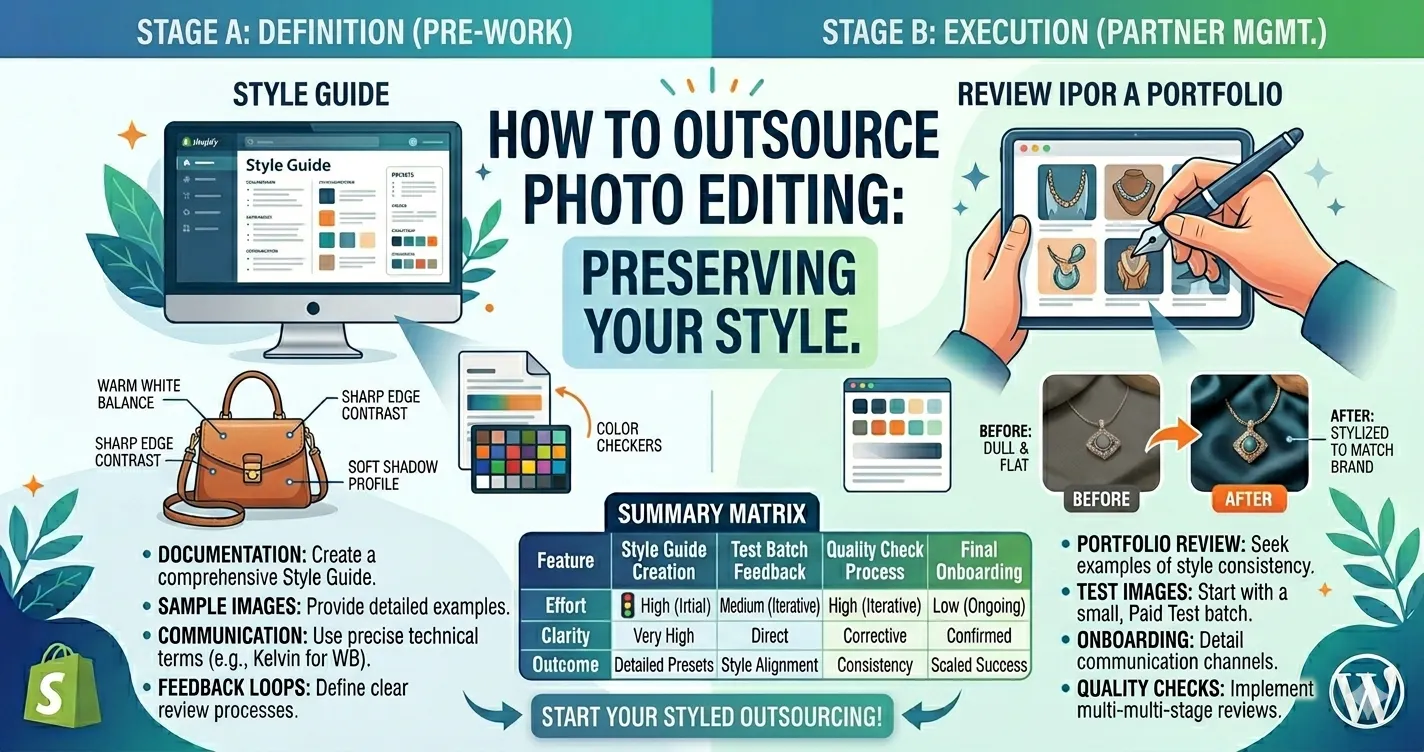
A reliable workflow usually follows these steps:
- Define your signature look: Identify what makes your edits recognizable. This may include warm highlights, true-to-life skin tones, soft greens, bright whites, deep shadows, or clean commercial clarity.
- Send strong reference images: Share finished photos that represent your best work. Avoid sending mixed styles unless you clearly label each look.
- Explain your non-negotiables: Tell your editor what must stay consistent, such as skin texture, color temperature, background cleanliness, crop style, or product color accuracy.
- Start with a small test batch: A test batch helps both sides check style alignment before you send a full gallery or large product set.
- Give direct feedback: Comments like “warmer skin,” “less contrast,” or “keep whites brighter” help much more than “make it better.”
- Create repeatable rules: Once the editor understands your style, turn your feedback into a simple editing guide.
- Scale gradually: Increase volume after the editor proves they can match your look across different lighting, subjects, and file types.
| PRO TIP |
| Your editing style is easier to match when you separate creative direction from technical correction. Tell your editor what should change, what should never change, and what “finished” looks like for your brand. |
| Want To Test Your Style Before Sending a Full Gallery?
Send a small sample set first so you can see how Clipixie approaches your color, tone, and retouching preferences. |
Who Needs a Style-Safe Editing Workflow?
Photographers need a style-safe editing workflow when they want more time without losing creative control. It helps solo photographers, studios, and commercial teams deliver consistent work at scale.
- Wedding photographers: Large galleries need consistent color, exposure, and skin tone from ceremony to reception.
- Portrait photographers: Clients expect natural retouching that still feels personal and true to your brand.
- Real estate photographers: Interiors need clean lines, balanced lighting, accurate color, and fast turnaround.
- Product photographers: eCommerce and marketplace images need polished, accurate, catalog-ready edits.
- Commercial photographers: Brand campaigns need consistency across every image, crop, background, and file format.
- High-volume studios: School, headshot, event, and seasonal work often require fast editing without batch-filter shortcuts.
How Better Outsourcing Improves Your Photography Business
A strong editing process improves your business by freeing your time while keeping the final images consistent. Let’s be real; most photographers do not outsource because they dislike editing. They outsource because editing consumes hours they could spend shooting, selling, or serving clients.
Here’s what improves when the process works:
- Brand consistency: Your galleries, listings, and portfolios keep the same polished look across shoots.
- Faster delivery: You can send client galleries, property images, or product sets sooner without late-night editing marathons.
- Fewer revisions: Clear editing instructions reduce misunderstandings and cut back-and-forth feedback.
- Better client trust: Clients feel confident when every image meets the quality they saw in your portfolio.
- More booking capacity: You can take on more work during busy seasons without burning out.
- Higher profit per project: Time saved on repetitive editing can go back into shooting, client communication, marketing, or sales.
| Need Reliable Editing Support Before Your Next Busy Season?
Clipixie can help you keep images polished, consistent, and ready for client delivery without changing your signature look. |
What Photographers in the USA and UK Should Know
Photographers in the USA and UK often work with tight timelines, high client expectations, and style-driven portfolios. Outsourcing works best when your editing partner understands that “good editing” is not one universal look.
A London wedding photographer may want soft tones, natural skin, and gentle highlight recovery. A New York commercial photographer may need sharp detail, clean backgrounds, and accurate product color. A real estate photographer in Manchester or Miami may need bright interiors without making the property look fake.
That’s why style matching matters. Clipixie does not treat every project as a one-click batch process. The goal is to understand the purpose of the image, your preferred finish, and the client’s final use.
For photographers, this is the real win: you can keep your creative voice while getting dependable production support behind the scenes.
DIY Editing vs. Clipixie Professional Editing
DIY editing gives you full control, but it also puts every correction, export, and revision on your schedule. Professional editing support gives you more capacity while keeping your direction at the center.
| DIY Editing | Clipixie Professional |
| You handle every file one by one | Clipixie editors follow your style notes and references |
| Quality depends on your available time and energy | Quality checks help keep results consistent |
| Busy seasons can delay client delivery | Extra editing support helps you meet deadlines |
| Repetitive corrections slow down your workflow | Manual editing saves time on detailed production tasks |
| Style stays clear in your head but may not be documented | Your style becomes a repeatable editing guide |
| Scaling means longer nights or fewer bookings | Scaling becomes easier with a trained editing team |
| Revisions compete with new shoots | Feedback can be built into the editing process |
Clipixie editors manually handle each image based on your instructions. That means thoughtful editing, not generic batch filters applied without context.
Common Mistakes That Can Change Your Editing Style
Most style problems happen because the editor receives unclear direction, not because outsourcing itself is risky. Avoid these mistakes before you send a large project.
- Sending vague instructions: “Edit like my portfolio” sounds clear to you, but an editor needs specific color, contrast, crop, and retouching notes.
- Skipping the test batch: A full gallery is too much to risk before you know whether the editor understands your look.
- Using mixed references: If one sample is bright and airy and another is dark and moody, your editor may not know which direction matters most.
- Not explaining skin tone preferences: Skin can shift fast with warmth, saturation, and contrast. Be clear about what looks natural to you.
- Ignoring file export settings: Wrong size, color profile, or naming can create extra work after editing.
- Choosing the cheapest option only: Low-cost bulk editing can cost more later if you spend hours fixing mismatched files.
- Giving feedback too late: Small corrections early help the editor learn your style before the project grows.
- Not separating project types: Wedding, real estate, product, and portrait edits need different standards. Label them clearly.
Practical Tips to Keep Your Look Consistent
You can keep your editing style consistent by treating outsourcing as a guided creative process. The editor needs your taste, your examples, and your feedback.
Build a Mini Style Guide
Include 10 finished images, 3 things you always want, and 3 things you dislike.
Mark Your Hero Images
Show the editor which photos best represent your brand. These become the visual benchmark.
Explain Color Preferences
Say whether you prefer warm, cool, true-to-life, muted, bright, contrasty, or soft edits.
Set Retouching Limits
For portraits, clarify whether you want natural skin texture, light cleanup, or polished beauty retouching.
Share Crop Rules
Tell the editor if you prefer tight crops, negative space, centered subjects, straight verticals, or platform-specific ratios.
Use Clear Feedback Language
“Reduce orange in skin,” “lift shadows,” or “keep greens less saturated” gives the editor something concrete.
Keep One Point of Contact
Consistent feedback from one person prevents mixed direction.
Review Early Files Carefully
The first test batch sets the tone for the full relationship.
Save Approved Examples
Approved edits become future references for similar projects.
| SIMPLE TIP |
| Create a folder called “Style Match References” and keep your best approved edits there. Send it with every new project until your editor fully understands your look. |
Pre-Submission Checklist for Photographers
Use this checklist before sending images to an editing partner. It helps reduce revisions and keeps the final result closer to your style.
| Category | Checklist |
| Style References | 10–20 finished images included
Favorite tones, colors, and contrast levels shown Examples labeled by shoot type |
| Editing Instructions | Exposure and white balance preferences noted
Skin retouching level explained Crop and composition rules included Background cleanup needs listed |
| File Preparation | RAW, JPEG, TIFF, PSD, or catalog format confirmed
File names organized Folder structure clear Export size and color profile specified |
| Project Notes | Client type and image use explained
Deadline included Priority images marked Any “do not edit” instructions added |
| Feedback Plan | Test batch requested
Revision expectations clear Approved edits saved for future reference |
How Clipixie Can Help
Clipixie helps photographers outsource detailed editing work while keeping their style, quality standards, and delivery needs in focus. The process is built around clear instructions, manual editing, and consistent output.
For photographers who need polished client-ready images, Clipixie’s photo retouching services can support portrait cleanup, product image refinement, background correction, color consistency, and other detailed edits. If you want to understand the workflow before sending files, the how it works page explains the process from upload to delivery.
Clipixie is especially useful when you need:
- Manual editing: Editors handle images carefully instead of relying on one-click filters.
- Style matching: References and feedback help guide the final look.
- Consistent quality: Quality checks help keep images aligned across a set.
- Flexible volume: Support can scale from small batches to larger seasonal workloads.
- Commercial-ready results: Edits can be prepared for portfolios, client galleries, listings, stores, and campaigns.
- Clear turnaround: A structured workflow helps you plan delivery with less stress.
The goal is simple: help you save editing time without making your work feel less like yours.
Commonly Asked Questions
Can I outsource photo editing and still keep my editing style?
Yes, you can outsource photo editing and still keep your editing style if you provide clear references, style notes, and feedback. The editor needs to understand your preferred color, contrast, retouching level, crop style, and final use. Clipixie uses your instructions to guide manual edits, so the finished images stay close to your brand.
What should I send to help an editor match my style?
Send finished sample images, before-and-after examples, preferred presets, and clear notes about what you like. Include details about skin tone, exposure, white balance, sharpness, backgrounds, and cropping. A small test batch also helps the editor learn your style before working on a larger project.
Is outsourcing photo editing good for wedding photographers?
Yes, outsourcing can help wedding photographers deliver large galleries faster while keeping a consistent look. Wedding galleries often include changing light, mixed locations, and hundreds of files. A style-matched workflow helps keep the final gallery cohesive from getting ready shots to reception images.
How many sample images should I provide?
A good starting point is 10–20 finished images that clearly show your preferred style. Choose images from similar lighting and project types when possible. For example, send wedding references for wedding edits, product references for product edits, and real estate references for interiors.
Will professional editors use my presets?
Many editors can use presets as a starting point, but presets alone rarely finish the job. Lighting, skin tone, exposure, and background conditions change from image to image. Clipixie editors manually handle each image, so presets can guide the look while human judgment keeps the final result polished.
What is the best way to give revision feedback?
The best feedback is specific, visual, and tied to examples. Instead of saying “not my style,” say “make the skin less warm,” “reduce contrast,” “keep shadows softer,” or “match the reference image labeled A.” Clear feedback helps the editor improve future batches faster.
Is outsourcing better than hiring an in-house editor?
It depends on your volume, budget, and workflow. An in-house editor may make sense for daily full-time editing needs. Outsourcing works well when you need flexible support, seasonal help, or professional editing without adding a permanent team member.
Can Clipixie help with both photographer edits and eCommerce images?
Yes, Clipixie can support photographers as well as commercial and eCommerce image needs. That may include portrait retouching, product cleanup, background editing, color correction, and polished image preparation. The key is sharing the right instructions for each project type.
Professional Editing Support That Protects Your Signature Style
Outsourcing photo editing does not mean giving up your creative identity. With the right references, test batch, feedback process, and professional editing partner, you can protect your style while getting valuable time back.
Clipixie helps photographers, studios, and online businesses create polished, consistent, client-ready images through careful manual editing and clear workflow support. Your style stays at the center. The production work gets easier.
| Ready To Keep Your Signature Look While Saving Editing Time?
Clipixie can review your references, follow your editing direction, and help create consistent images that still feel like your work. |